Direct Mail Communications Summary - Vehicles Tab
The Vehicles tab on the Report Results panel on the Direct Mail Communications Summary screen is used to review sales information, such as amount of revenue generated from sold matches, for new, used, and certified vehicles sold during the report period.

|
To access the Vehicles tab, select the Vehicles tab on the Report Results panel on the Direct Mail Communications Summary screen. |
 Vehicle Sales Results Section
The Vehicle Sales Results section is used to review sales information, such as the number of sold matches, based on vehicle sale type. In addition, this section is used to review gross profit information, such as the average gross profit for sold matches based on vehicle sale type.
Note - Gross profit information only displays on this tab if the View Gross Profit check box is selected on the Report Criteria panel.
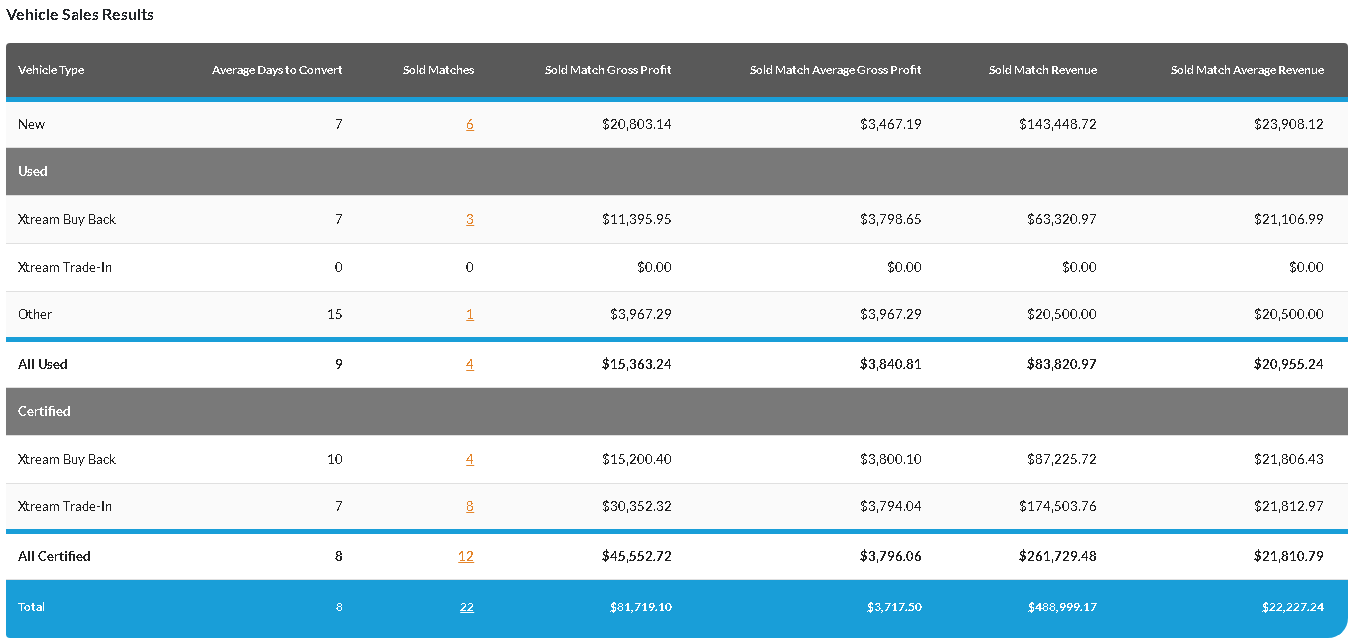
The following items display in the Vehicle Sales Results section.
Vehicle Type: The category of vehicle sold, such as New or Used, displays.
Average Days to Convert: The average number of days for a lead generated from a direct mail campaign for the corresponding vehicle sales type to become a sold match displays.
Sold Matches: (Link) The number of sold matches associated with the corresponding vehicle sales type during the entered date range displays. Click this link to display the Detailed Results window, where details of the transactions can be reviewed.
Sold Match Gross Profit: The gross profit displays for sold matches associated with the corresponding vehicle sales type during the entered date range.
Sold Match Average Gross Profit: The average gross profit generated from sold matches associated with the corresponding vehicle sales type during the entered date range displays.
Sold Match Revenue: The revenue generated from sold matches associated with the corresponding vehicle sales type during the entered date range displays.
Sold Match Average Revenue: The average revenue generated from sold matches associated with the corresponding vehicle sales type during the entered date range displays.
Vehicle Acquisition Results Section
The Vehicle Acquisition Results section is used to review sources of vehicle acquisitions.

The following items display in the Vehicle Acquisition Results section.
Vehicle Type: The source of the received vehicle, such as Xtream Buy Back or Xtream Trade-In, displays.
Average Days to Convert: The average number of days for a lead generated from a direct mail campaign for the corresponding vehicle sales type to become a sold match displays.
Acquisition Matches: (Link) The total number of received vehicles for the corresponding source during the entered date range displays. Click this link to display the Detailed Results window, where details of the transactions can be reviewed.
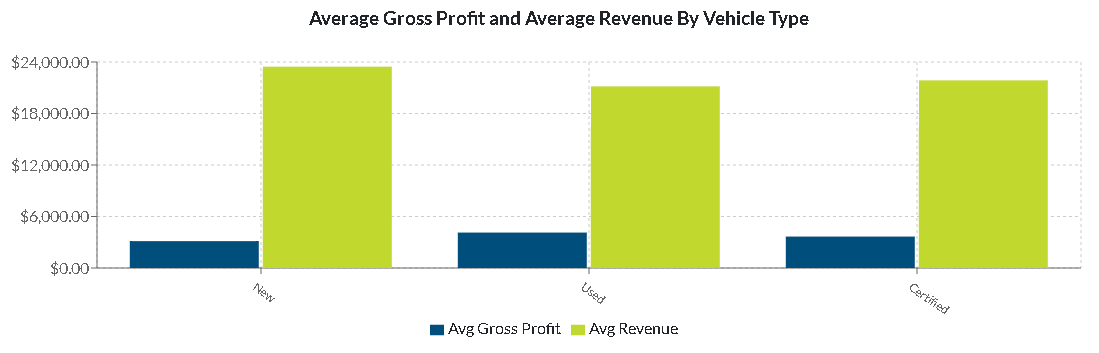
Average Gross Profit and Average Revenue By Vehicle Type Section
Top 5 Vehicle Models Sold Section
The Top 5 Vehicle Models Sold section is used to review sales statistics for the best selling vehicle models. A subsection displays for new, used, and certified vehicle models.
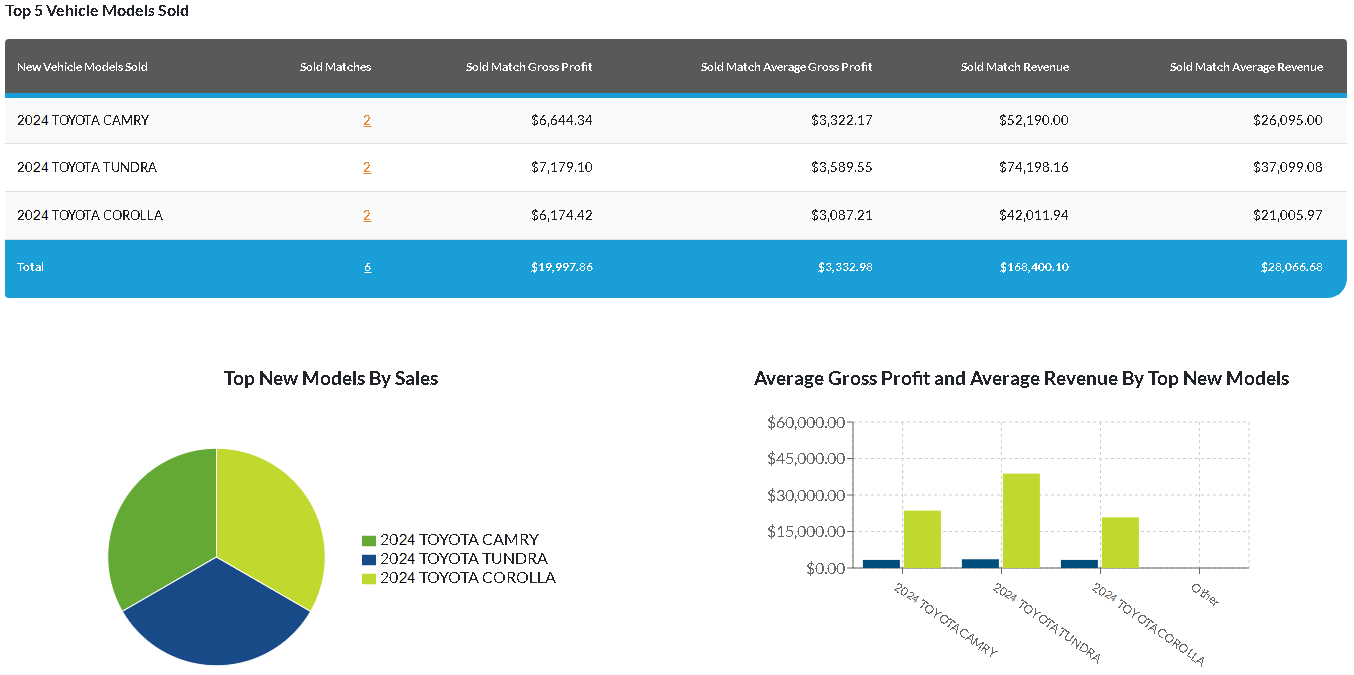
The Top Models By Sales graph displays the percentage of sales for each of the top five models. Hover the mouse cursor over a section on the graph to display a tooltip with the percentage of sales for the corresponding model.
The Average Gross Profit and Average Revenue By Top Models graph displays the average gross profit and revenue generated for vehicles sold for each of the top five models. Hover the mouse cursor over a bar on the graph to display a tooltip with the average gross profit and revenue for corresponding model.
Note - Gross profit information only displays on this tab if the View Gross Profit check box is selected on the Report Criteria panel.
The following columns are available in the Top 5 Vehicle Models Sold section.
Vehicle Models Sold: The year, make, and model of the vehicle display.
Sold Matches: (Link) The number of sold matches associated with the corresponding vehicle sales type during the entered date range displays. Click this link to display the Detailed Results window, where details of the transactions can be reviewed.
Sold Match Gross Profit: The gross profit displays for sold matches associated with the corresponding vehicle type during the entered date range.
Sold Match Average Gross Profit: The average gross profit generated from sold matches associated with the corresponding vehicle sales type during the entered date range displays.
Sold Match Revenue: The revenue generated from sold matches associated with the corresponding vehicle sales type during the entered date range displays.
Sold Match Average Revenue: The average revenue generated from sold matches associated with the corresponding vehicle sales type during the entered date range displays.
Click here for a list of products that may be mentioned in this help file.